Debounce vs Throttle: From Elevator Buttons to Kubernetes
Pressing the elevator button ten times calls it once. The hallway light goes off only after you stop moving. Those are throttle and debounce, and the same two rules run your search box, your alerts, your Kafka producer and your autoscaler. Nine places where they live, the knob each one exposes, and what breaks when the window is wrong.
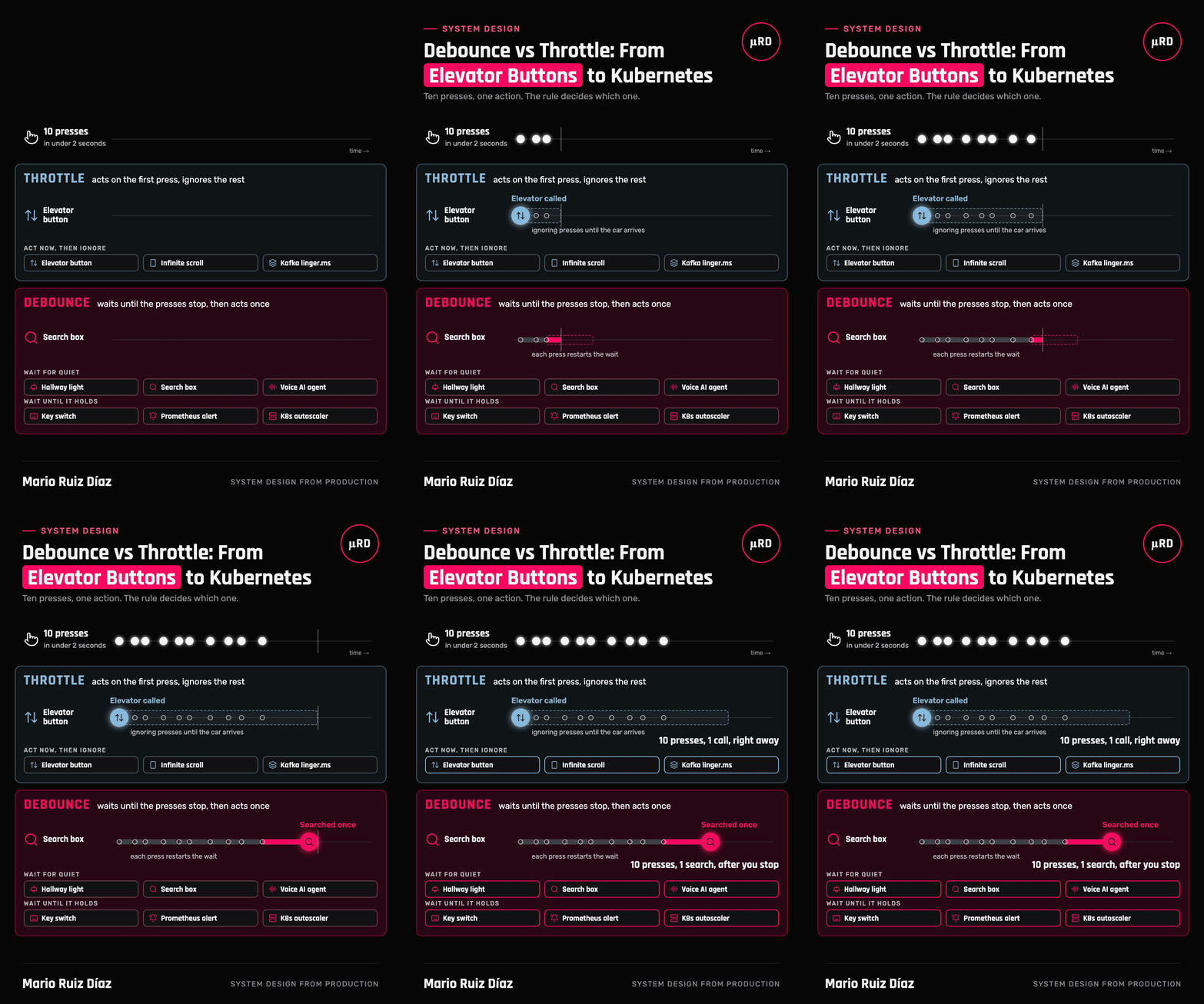
Everyone has watched someone press the elevator button five times, as if the elevator could tell they were in a hurry. It can't. A safety brochure from Washington State's Department of Labor & Industries files it under myths: the call "is registered just once; repeated button-pushing won't bring an elevator sooner" (L&I, Elevator Safety).
Now think of the hallway light with a motion sensor. It doesn't turn off ten seconds after you walk in. It turns off a fixed time after the last motion it detected (Lutron, Application Note #489). Keep moving and it stays on; stop, and the countdown finally runs out.
Those two machines run the two most useful timing rules in software:
- Throttle: act on the first event, then ignore the rest for a while. The elevator.
- Debounce: wait until the events stop, then act once. The hallway light.
Both turn a burst of events into one action. They differ in when that action happens, and that difference decides whether your search box feels instant or laggy, whether your on-call engineer sleeps, and whether your cluster thrashes. This article follows the two rules through nine places, from a building to a Kubernetes cluster.
The two rules, precisely
Throttle guarantees an action at most once per window. Lodash's definition is the clearest: it "only invokes func at most once per every wait milliseconds" (Lodash docs). It can act at the start of the window (the leading edge, like the elevator), at the end (the trailing edge, like a batch that is sent when its window closes) or both.
Debounce acts once, after a quiet period. Every new event restarts the timer; the action runs only when wait passes with no new event. David Corbacho's classic explanation puts it as grouping a burst of sequential calls "in a single one" (CSS-Tricks, 2016).
The two are closer than they look. In Lodash's source, throttle is a debounce with a ceiling on how long it may wait (lodash.js 4.17.21):
return debounce(func, wait, {
  leading: leading,
  maxWait: wait,   // never wait longer than one window
  trailing: trailing,
});
That one line is the whole relationship: a debounce that keeps getting events would wait forever, and maxWait turns it into a throttle that acts at least once per window.
Scroll sideways to see the full diagram →
There is a second flavour of debounce worth separating, because it shows up all over infrastructure. Wait for quiet acts after the events stop (a search box, a hallway light). Wait until it holds acts after a condition has stayed true long enough (a key switch, an alert, an autoscaler). Same rule, applied to a state instead of a stream of events.
Act now, then ignore: throttle
1. The elevator button
What you see. You press once, the button lights up, and every extra press changes nothing.
The rule. A leading-edge throttle. The first press registers the hall call; further presses are absorbed until the car arrives and the call is served. The window isn't a fixed number of milliseconds, it's "until the request is done".
Why it works. The person waiting wants a fast reaction to the first press (the light), and the system has nothing to gain from more presses. The brochure's advice is exactly the rule: "Push the elevator call button once."
A caveat that keeps the analogy honest: elevator dispatch is proprietary, and some patented controllers deliberately treat repeated presses as a signal. The brochure describes the common case, not every elevator in the world.
2. The infinite scroll
What you see. You flick through a feed on your phone, and new posts appear before you reach the end.
The rule. A scroll event fires many times per second, and running layout math or a fetch on each one makes the page stutter. MDN's guidance is direct: "If you notice a jank while fast scrolling, you should consider throttling the event," and its example throttles with setTimeout to one run every 20 ms (MDN, scroll event). It also warns that throttling with requestAnimationFrame no longer helps, because it fires at the same rate as scroll events.
The better answer. For "load more when the user nears the end", MDN points to IntersectionObserver and lists infinite scrolling as one of its use cases (MDN). The browser tells you when a sentinel element becomes visible, so you don't need a scroll handler or a throttle at all. Reach for the platform before reaching for a timer.
3. Kafka's linger.ms
What you see. Nothing, which is the point. Your producer sends one network request carrying many records instead of one request per record.
The rule. A trailing-edge throttle used for batching. When a record arrives, the producer waits up to linger.ms for more to join it, then sends the batch, or sends sooner if the batch reaches batch.size (16 KB by default). Kafka's docs compare it to Nagle's algorithm in TCP (Apache Kafka producer configs).
The knob changed. The default was 0 (send immediately) until Apache Kafka 4.0 moved it to 5 ms (KIP-1030). Five milliseconds of waiting in exchange for fewer, larger requests is a trade the Kafka maintainers decided most producers should make by default.
Notice that this is not a debounce: new records do not restart the wait. A debounce would never send while records keep flowing, which is exactly what a producer must not do.
Wait for quiet: debounce
4. The hallway light
What you see. The light stays on while you move and goes off a while after you leave.
The rule. A trailing debounce on motion. Lutron describes the timeout as the time "after which the lights will go out after the last motion is detected," with settings of 1, 5, 15 or 30 minutes and a default of 15 (Lutron #489).
What a wrong window costs. Too short, and the lights go out on someone reading at their desk (the sensor can't see a person sitting still). Too long, and you lose the energy savings that justified the sensor. Every debounce has this tension: the window has to be longer than the natural pauses in the activity, and no longer.
5. The search box
What you see. You type "coffee shop", and results appear once, right after you stop typing, not after every letter.
The rule. A trailing debounce on keystrokes. Algolia's docs say InstantSearch "generates one query per keystroke by default," recommend debouncing, name "200 ms" as the preferred delay and warn that "delays of over 300 ms will start degrading the user experience" (Algolia, Improve performance).
Scroll sideways to see the full diagram →
Two things debounce does not do.
- It doesn't order responses. If the request for "coff" comes back after the one for "coffee", a naive UI shows stale results. Cancel the previous request when a new one starts (
AbortController), or ignore responses that are not for the latest query. - It doesn't protect the server. Debounce lives in the client, and anyone can call the API directly. The server still needs its own per-client rate limit. Debounce is a courtesy; rate limiting is a control.
6. The voice AI agent
What you see. You call a business, an AI answers, and it doesn't cut you off while you're spelling your street name.
The rule. A trailing debounce on the caller's voice, called endpointing or turn detection. The agent waits for a pause before it treats your turn as finished.
Why this window is hard. Humans are fast at turn-taking. A study across ten languages found the gap between a question and its answer clusters between 0 and 200 ms (Stivers et al., PNAS 2009). But pauses inside a turn, while someone thinks or reads a number, are generally longer than the gaps between turns (Heldner & Edlund, 2010). Silence alone can't tell "I'm done" from "let me check". A short window talks over people; a long one makes the agent feel slow. This is the one place in the list where I run the rule in production, so it gets its own case below.
Wait until it holds: debounce on a state
7. The key switch, where the word comes from
What you see. You press a key once and get one character, not five.
The rule. Inside a mechanical switch, metal contacts physically bounce for a moment before they settle, so a single press looks like a quick series of on/off transitions to the electronics. Jack Ganssle measured 18 switches: excluding two outliers, the average bounce was about 1.6 ms, the worst was 6.2 ms, and one outlier bounced for 157 ms when opened. His recommendation is to pick a debounce period in the 20 to 50 ms range (Ganssle, A Guide to Debouncing).
Why it matters for software people. This is the literal origin of the word: de-bouncing a signal means accepting a new state only once it has stayed stable for a while. Every other debounce in this article borrowed the idea.
8. The Prometheus alert with for
What you see. You don't get paged at 3 AM because CPU spiked for ten seconds.
The rule. An alerting rule with for: 5m doesn't fire when its condition first becomes true. The alert enters a pending state, and Prometheus only counts it as firing once the condition has held for the whole duration (Prometheus, alerting rules). If the condition goes false in between, it goes back to inactive and the wait starts over.
Scroll sideways to see the full diagram →
And the other direction. keep_firing_for keeps an alert firing for a while after its condition was last met, so an alert that flaps around the threshold doesn't resolve and re-page every minute. One debounce on the way in, one on the way out.
What a wrong window costs. Too short, and you train people to ignore pages. Too long, and a real outage runs for minutes before anyone hears about it. Size it against how long the condition can be true without users noticing.
9. The Kubernetes autoscaler
What you see. Traffic dips for a minute and your pods don't disappear, only to be recreated when traffic comes back.
The rule. The HorizontalPodAutoscaler "considers all recommendations within a configurable window choosing the highest recommendation from within that window." For scaling down, the window is 300 seconds by default (behavior.scaleDown.stabilizationWindowSeconds); for scaling up "there is no stabilization window" (Kubernetes, HPA).
The design choice worth copying. The rule is asymmetric on purpose. Adding capacity late hurts users, so scale-up acts immediately. Removing capacity early hurts users too, so scale-down waits until low load has held for five minutes. When the cost of acting too early and acting too late differ, give each direction its own window.
Choosing between them
| Ask yourself | Use | Example |
|---|---|---|
| Should the first event get an immediate reaction, and do the rest add nothing? | Throttle, leading edge | Elevator button, "Pay" button disabled after the first click |
| Do I need regular updates while events keep coming? | Throttle | Scroll position, progress bar, live cursor in a shared doc |
| Do I only care about the final value after the burst? | Debounce, trailing | Search box, autosave, window resize, voice turn detection |
| Should a condition be stable before I act on it? | Debounce on a state | Key switch, alert for, autoscaler scale-down |
| Am I trading latency for fewer, bigger requests? | Throttle as a batch window | Kafka linger.ms, log shippers, metrics flush |
How they go wrong
- A debounce that never fires. If events never stop (a stream of sensor readings, a user who keeps typing), a pure debounce never acts. Add a ceiling, like Lodash's
maxWait, so it acts at least once per window. - A throttle that drops the last event. A leading-only throttle can ignore the final value the user actually ended on. Enable the trailing call too.
- Stale responses. Debouncing reduces requests; it doesn't order them. Cancel or ignore anything that isn't for the latest input.
- Mistaking a courtesy for a control. Client-side debounce and throttle make a polite client. They are not rate limiting, abuse protection or idempotency. The server enforces its own limits.
- A window nobody sized. 200 ms for typing, 20 to 50 ms for a switch, five minutes for scale-down, 15 minutes for a light: every good window comes from the natural rhythm of the thing it listens to. Measure that rhythm before picking a number.
Real-world case: turn-taking in the Afterhour voice receptionist
Scroll sideways to see the full diagram →
Situation. Afterhour is a multi-tenant AI voice receptionist for law firms, which I built for Big Voodoo Interactive. Callers are often stressed, and they dictate the details a firm needs: names, addresses, dates, case numbers. People pause in the middle of all of those, to think, to read from a letter, to spell a word.
Task. Keep the agent from talking over the caller during those pauses, without making it feel slow, and let the caller take the turn back cleanly when they interrupt.
Action. Two timing rules, configured on the voice provider (VAPI) in every receptionist template:
- Turn detection as a debounce.
startSpeakingPlan.waitSecondsis the minimum silence the agent waits before replying. Afterhour runs it at 0.8 s, twice VAPI's default of 0.4 s (VAPI, speech configuration). The extra 400 ms is the price of not answering in the middle of "my address is 2-1-4… Oak Street": an agent that replies on the first short pause talks over exactly the callers who are giving it the information it needs. - Barge-in as "wait until it holds".
stopSpeakingPlan.numWords: 1means the caller has to actually say a word before the agent stops (the default, 0, stops it after 0.2 s of detected voice, so a cough or a "mm" is enough).backoffSeconds: 2makes the agent wait 2 s after being interrupted before it talks again, double the default of 1 s, so the caller can finish the thought they interrupted with. - A speech model built for phone audio ahead of both rules, so the rules act on clean words rather than line noise.
Result. The same two rules have been part of every Afterhour receptionist template since the templates were first written, and the platform has processed more than 25,000 calls in production with them. The lesson I keep from it: a debounce window is a product decision disguised as a number. 0.4 s and 0.8 s are both "correct"; one is tuned for a quick back-and-forth, the other for callers dictating details to a law firm.
Read the full case: Afterhour, a multi-tenant AI voice receptionist →
The takeaway
Throttle and debounce are not frontend tricks. They are two answers to one question that every system faces: a burst of events arrives, and you want one action. Do you act on the first one, or on the last? The elevator answers "the first, then I ignore you". The hallway light answers "the last, once you're gone". Your search box, your Kafka producer, your alerts and your autoscaler are each answering the same question, and the window they use is a choice about what the people on the other side will feel.
References
- Washington State Department of Labor & Industries, Elevator Safety (F621-084-000, 2006).
- Lutron, Application Note #489: Maestro Dual-Circuit Occupancy Sensor (Rev B, 2019).
- Lodash,
_.debounceand_.throttleand source, v4.17.21. - David Corbacho, Debouncing and Throttling Explained Through Examples (CSS-Tricks, 2016).
- MDN, Document: scroll event and Intersection Observer API.
- Apache Kafka, Producer configs and KIP-1030.
- Algolia, Improve performance for InstantSearch.js.
- Stivers et al., Universals and cultural variation in turn-taking in conversation (PNAS, 2009).
- Heldner & Edlund, Pauses, gaps and overlaps in conversations (Journal of Phonetics, 2010).
- VAPI, Speech configuration.
- Jack Ganssle, A Guide to Debouncing (2008).
- Prometheus, Alerting rules.
- Kubernetes, Horizontal Pod Autoscaling.